Zombie tutorial
During this tutorial I was finishing the character state machine within Unity, this week I completed all sections (green, orange & red).
First, I started by implementing the AI to chase the player. There are different ways to achieve this such as using a sphere collider to detect when player is in range, sensors to detect sounds etc. but the tutorial covers a way by detecting the player by using a ray cast (shoots a ray from a point to a surface to detect intersections). To implement this I created a method called “CanSeePlayer()” and also changed the tag on the player to “Player” this is required as we only want the ray to detect the player and nothing else.
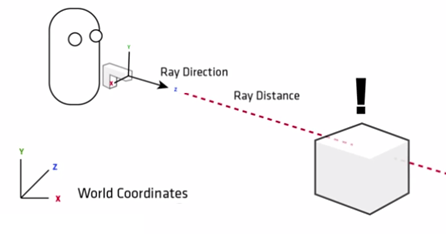
The function worked by looking straight ahead of the AI character but in a 90 degree arc so this mimics real field of view perception. I then checked if the ray cast hits the player and if so then the function returns true (AI can see player), so then it then changes the state from wandering to chasing and will walk towards player. Also to keep the chasing state simple for now we revert the state back to wandering if “CanSeePlayer()” is false, this way the states can freely transition between each other correctly. I also added an debug draw ray so which is shown by the green line; this helped me with debugging to see if the AI was detecting the player as intended.
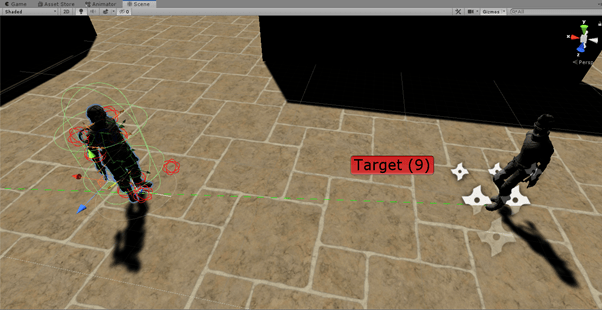
Next, was to implement the dead state which would effectively end the finite state machine of the AI. I setup a new method called “kill()” which would transition to the dead state, but to make this work correctly I had to setup a few things in the editor first. I would not use a death animation but instead a ragdoll effect which also simulates death as lifelessness such as a doll, I then created a ragdoll on the zombie and then dragged the relevant joints of the zombie into each section, once created I made sure that they were all enabled as “isKinematic” to disable the ragdoll on start and disabled each joints collider as this could incur unexpected results as I found out.
Inside the AI script it’s important that I disable things such as Animatior, NavMeshAgent, Scripts, Rigidbody and colliders etc. this is because the zombie is now dead and no longer serving a purpose so we clean up everything so no strange bugs start to happen with the AI and then destroy the zombie after some time.
The final thing to do was to kill the zombie during the shooting animation. I added an empty game object to where the gun barrel end would be placed and then fired a ray from this location forward. In the “HitEnemy” script I make a reference to the enemy’s script so I can call the kill method here, it then checks if the object it is hitting is a zombie with the relevant tag and then uses a “isShooting” bool to prevent the zombie from dying when just walking into the players gun so only when the player is shooting can the zombie be killed.

The final part of the tutorial was to texture the environments, I have done this process many times before and is simply done by creating a material and adding an image texture and effecting the tiling options to make it fit correctly, then applying the material to the game object.
Lab 3 – Problems within AI
AI is the main driving point of a good majority of games, whether this is in terms of racing games to MMORPG. However, as with anything this comes with its own set of issues / problems as everyone wants to have the best AI within their games.
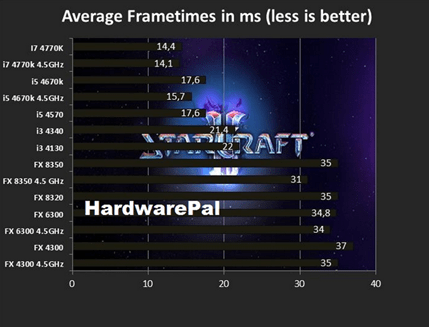
CPU time – Notorious heavy AI games such as StarCraft or any RTS game take a massive amount of CPU time as all the calculations required such as A* pathfinding to make the game interesting and fun are very expensive, and more AI means more CPU time. This was previously a large issue as there was a trade of between rendering and AI and depending on the game one side would be favoured more, but as technology is improving such as multithreading and GPU’s, GPU’S have now taken over the rendering this means more CPU is now available to the developers so they can create much more complex interesting and fun AI for the player.
Fun vs the best AI – Even though machine learning algorithms have been around for many years we have only recently been able to implement them due to the computational strain they have on computers and now have been shown to be incredibly effective in learning games and have even beaten grandmasters in games like chess in record time which has led to them quitting the game for ever.
However, in games we don’t always want the best AI because if the player finds it impossible to win then it ruins the immersion and the enjoyability of the game. In fact, such games like Dark souls require the player to learn how the AI works in order to beat the game and failure to do so will lead to them dying many times, in most games AI is usually slightly “dumb” in order to give the player a chance but being too dumb just gets boring and this is where difficulty levels have been used to keep the game fun and interesting for all skill levels of players.

This leads to issues between developers in finding a “middle ground” of AI in which it is constantly fun, immersive and challenging to the player (not just repeating same tactic over and over) so the player will never get bored. Also, even though machine learning algorithms is very advanced AI, and has been shown to work in games, the question is will it take over the AI that we used to, to give us a new innovative experience.
 304CR Games & AI