Zombie Tutorial
During this tutorial I was introduced to character control with state machine in Unity, this week I completed all sections (green, orange & red).
I did not need to complete the “Changing AI character’s target with a script” section as I completed the amber section last week.
So I went on and started by changing the behaviour of the AI controller to work with just wandering around the environment (chasing and attacking the player will come later on in the tutorial), there are many different ways to achieve this goal like in very in-depth games but for this tutorial it was focused on using empty game objects as waypoints to walk from each point going through each in the list (+1 each time). The script would know that these are as we would attach a tag to them (“Waypoint”) and then this tag is then looked for by the script, this ensures that no other object in the world could potentially affect the AI movement. I placed 10 waypoints around the environment in a sequence so the AI could easily just “wander” around its environment.
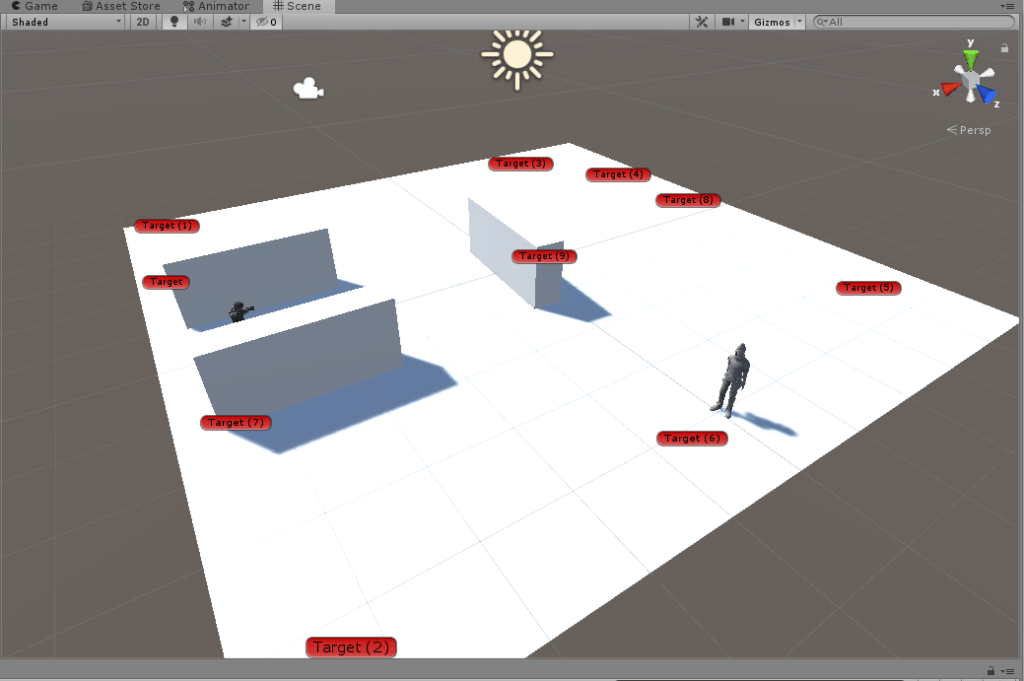
I extended the AI character controller to incorporate this new behaviour; it works by when starting it will create a new variable to store all game objects with tag “Waypoint” then if the character is in wandering state it would set its current target to the next waypoint in the array / list. Once it reaches that target it will then go to the next one and so on.
This is good for some AI however, players tend to quickly learn patterns to its important to have them random in some way so instead I decided to randomize the next waypoint the AI chose, this gives it a more re-playable effect so it engages the player to think more creatively on how to avoid the target instead of just boringly learning the pattern.

Next, I then chose a new character which I found from Mixamo, I have used this before so it was very straight forward to change the character, and I chose a new character and then replaced the Ethan character. I did have to have to change the materials to opaque as the imported model came as transparent and also change the rig type to humanoid, I just reused the running animation which came from third person controller to make my model move as normal.
For the final part I then went back to Mixamo and found a fighting animation to use and imported it. I then opened up the animator controller which I was using and created a new state which would serve as my “Shooting” state. I created a new bool parameter (isShooting) which would be used for animation within a script, I made two transitions one to the “Grounded” state and one from the “Grounded” state and this was indicate the transitions to and from movements. I then used the “isBoxing” parameter on this transitions to control whether or not it should play the shootinganimation. Finally, I created a small script which would go on the player which store the animator controller component and then set the “isShooting” parameter to true if the player pressed the “b” key.


Lab Task – Movement & Pathfinding
How Unity works under the hood
Navigational meshes (NavMesh) are used in majority of games especially the ones using AI and this is something that will be used and refined within my Zombie game.
Unity uses A* algorithm; this is a graph traversal and path search algorithm, this efficiently plots a walkable path on a map with many obstacles and works out a path from points A to B using nodes. Inside unity it works by the walkable areas by a series of convex polygons. Convex polygons are useful as we know that there are no obstructions between any two points inside a polygon.
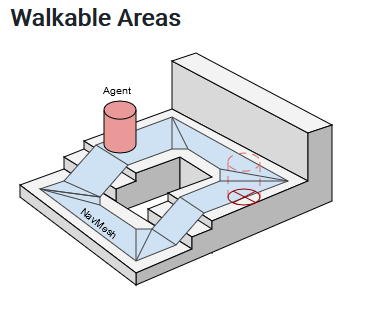
For an agent to be able to follow the path the AI will reach the destination by always steering towards the next visible polygon (corridor). However in my zombie game it will have many agents so to deal with this they need to deviate from the original path when avoiding each other to get smooth realistic movement.

What I think the performance factors are
For navmesh calculations within a game of one agent is not that computationally intensive however, once you start to have many agents such as 50+ then this can lower frame rate significantly if not properly optimized. Imagine you have one agent updating itself 120 times a second (120FPS for example) then once you have that 120 * 50 (50 agents) = 6000 then you can understand why it slows down performance as the algorithm has to work the new position 6000 times per second and generally A* is not the most efficient algorithm but works the best in games. To avoid this you could instead cut the amount of times you update to maybe once per second or half a second, usually if done correctly the player won’t notice this and will lead to much better performance.
Cases you can think of the AI might struggle with
Finally, it’s known that players like to cheat and test the AI to see what exploits they can get away with, I personally have done this and it usually happens when the player jumps up onto a higher location where they start attacking AI NPC however, the agent is unable to traverse the nav mesh to them. So this is a big issue within games and preventing players from doing this is usually a big priority, a way to get around this issue is by teleporting the NPC to the player if the NPC is not able to reach them.
 304CR Games & AI